
Going Full-Terminal on Jira
I’ve spent countless hours using some issue tracking software or another in my career, especially when in leadership roles. While apps like Jira or Azure DevOps are good, there is a lot of repetitiveness and potential for automation. LLMs and coding agents open the door to implement automations, but also connecting all sorts of agentic workflows to that software.
For context, I’m a solo developer working on a SaaS project in the area of observability. Not to go into too much detail, it’s a web app in microservices architecture deployed on Kubernetes in GKE.
Let me share some of the cool stuff that I did in my own setup with Jira, which made a big difference in my day-to-day.
1. Connect your agents to Jira with MCP/CLI
The first low hanging fruit is connecting to the Jira MCP or installing jira-cli . That alone can be a big productivity boost, enabling you to open follow-up issues during agent sessions, find old tickets with natural-language descriptions, etc.
The next step would be to create skills that instruct the agent about your Jira project. How you like setting the fields, conventions, common operations, etc.
I added just two skills myself: create-jira-issue and jira-start-issue.
I’ll describe the “jira-start-issue” skill, because it’s a precursor to some cool automation. It accepts an issue ID like ABC-123, and running it will:
- Create a branch called ABC-123-title_slug
- Open a Claude or Codex session that reads the problem in the ticket and starts working on it
- When the implementation is done, if there were no problems that need a human’s decision, run another agent session (fresh context) that does verification and code review + auto-fix obvious bugs
By the way, since the branch name is the issue ID, it’s easy for any follow up scripts to find the Jira ticket in question and change its status, add comments, etc.
2. Fast, scriptable TUI
A lot of my time, even as a solo developer, is spent going over the work items. Editing, prioritizing, adding new ones.
I’m a mouse hater, and working with the keyboard only is terrible in Jira, and most web apps for that matter. Not to mention, slow. I always wanted a keyboard-first tool that can quickly create, view, filter, edit, and reorder work items. And now, with agentic capabilities, it would also be useful to have something that is customizable enough to plug agent workflows.
Those requirements are fulfilled well by a terminal UI (TUI) app. A couple of those actually exist for Jira already, but they didn’t quite suit my use case.
After a brainstorm session with Claude Code, we came up with the following setup:
A single bash script, jira-board, glues jira-cli to fzf
. jira-cli fetches the board and does every write back to Jira. fzf is the UI, and the script is the layer in between: it feeds fzf the issue list on the left and renders a preview card for the selected issue on the right.
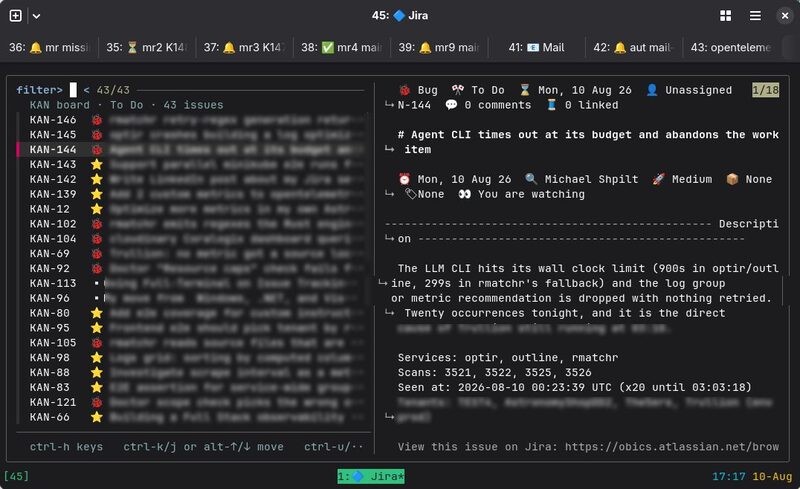
fzf is a fast fuzzy search TUI that works with a list of items. It gives me fast search & filter, keybindings to change status or labels, alt+up/down arrows to reorder in the board, shortcuts to quick-filter by status, label, or type, and more.
The power of this is that even though my little app has a small % of the features of the web app, it doesn’t matter. The features that I do use work fast and are accessible with a keyboard hotkey, so it’s an extremely effective workflow.
 From the author
I also build Obics
Obics is a telemetry optimization tool to remove observability spend and noise. It finds redundancies in logs, metrics, and traces, and opens pull requests to fix them at the source.
Take a look →
40–60%
Lower observability costs
Finance gets the savings. Without shutting down observability or losing visibility.
20–30%
Faster MTTR
DevOps and SRE get clean dashboards and alerts that fire on real issues.
Zero
Cleanup overhead
Developers stay focused on product. No more being pulled into telemetry cleanup.
From the author
I also build Obics
Obics is a telemetry optimization tool to remove observability spend and noise. It finds redundancies in logs, metrics, and traces, and opens pull requests to fix them at the source.
Take a look →
40–60%
Lower observability costs
Finance gets the savings. Without shutting down observability or losing visibility.
20–30%
Faster MTTR
DevOps and SRE get clean dashboards and alerts that fire on real issues.
Zero
Cleanup overhead
Developers stay focused on product. No more being pulled into telemetry cleanup.3. Agentic workflows from the TUI
The original goal of this exercise was to run agentic automations with Jira tickets, and now we have a foundation for that. We have the CLI, the skills, and the scriptable UI tool to put it all together.
Here’s my main agentic workflow that I start from the Jira TUI. Pressing ctrl+o on a selected issue will:
- Open a new terminal tab with tmux
- Create a branch called ABC-123-title_slug
- Open a Claude or Codex session that starts working on the ticket instructions
- When done, run another session (fresh context) that does verification and code review + auto-fix obvious bugs
If you’ve been following, steps 2-4 do the same as my skill “jira-start-issue”.
This automation means that with a button click, I get Claude Code or Codex working on a Jira ticket, do code review, verify it in runtime, and auto-fix bugs without human intervention (unless there are problems). I can start work on 5 issues this way in 1 minute, go to lunch, and when I’m back I’ll have them mostly finished.
4. Full issue lifecycle / Closing the Loop
Boris Cherny (the creator and manager of Claude Code) published an interesting table called “Steps of AI adoption”.
He describes the 3rd step as “Parallel”: work with 5-10 agents in parallel. One engineer orchestrates 5–10 agents on separate worktrees or git checkouts, jumping between sessions..
The 4th step is called “Supervised autonomy” (~100 agents) and described as Claude writes all or nearly all code. "Did you read the code?" becomes "what context was the model missing and how do we fix it next time?" Proactive maintenance runs in the background — cleanup that waited for someone with time now runs continuously.
I’m somewhere between the 3rd and the 4th step. The transition to “supervised autonomy” is automating the creation of issues, automatically starting work on them, and even finishing PRs autonomously. This leaves me to supervise, mostly after the fact, on the results.
Jira can act as the state database for the agents doing all this.
Right now I have a nightly script that goes over application logs from the last 24h, analyzes them, and files bugs if there are problems. Every time a bug repeats, the script adds a comment in Jira. When a bug occurs more than 3 times in the last 10 days, i.e. has 3 or more comments, the script starts a Claude Code session solving the bug.
The next step might be to allow this automation to create the pull request and even merge it (if there weren’t problems that need my attention), but I’m not there yet.
Recap
There are four pieces to this, each one building on the last.
- Jira from the agent — MCP or
jira-cli, plus a couple of skills that teach the agent my conventions, so agents can read and write tickets themselves. - Jira from the keyboard —
jira-board, a bash script gluingjira-clitofzf, giving me a fast board with no mouse. - Agents from the board — ctrl+o on an issue spins up a tmux tab, a branch, a coding session, and a review session.
- Closing the loop — a nightly script that files bugs from the logs and starts an agent on the ones that keep coming back.
In this flow, Jira becomes less of an app that I’m opening in the browser and more of something my agents query.



Comments
Loading comments…