
My perfect email client was there all along
Let’s admit it, the popular desktop email clients suck for power users. Both Gmail and Outlook are slow, push their own (bad) AI on you, have terrible search (some more than others), and are not customizable. They are a poor common denominator that makes me upset when I use them.
For years I’ve dreamt of the perfect email app, without really knowing what it is or what it would look like. But it had to have the following things:
- A unified inbox: I think I’m not alone in having multiple emails. So why do I have to keep 4 tabs open with Gmail?
- Fast: Waiting a second for each interaction is fine for most web apps, but not for an email client where I have to read and write dozens of times a day.
- Keyboard as a first class citizen: Both Gmail and Outlook try to get it right, but there’s always something that makes me reach for the mouse to scroll, add a CC, or whatever. In those apps, it’s an afterthought.
Now with capable AI agents, there is a new, much more important requirement: being scriptable. A scriptable email app means I can add keybindings and ask my agent to do whatever. Draft a reply, find a time in my calendar, order a pizza when there’s a discount. And while I do appreciate Google and Microsoft adding AI features, they charge a high monthly fee for an AI model I don’t really want, and one that I can’t (easily) modify with my own skills and memory.
Moving to Linux
I recently moved from Windows (after 30 years ) to Linux. That transition opened a lot of doors, especially for terminal use cases, which I love.
I’m a keyboard junkie. Partly because it’s faster and partly because I have an RSI going and I prefer not to strain my hands by reaching for the mouse. That fits perfectly with terminal UIs (TUIs) and vim-like bindings. In that regard, you’ll understand when I say I moved from the worst possible choice (Windows) to the best one (Linux). One of my favorite things to do with my new toy (Linux) is to find TUI alternatives to the web apps. I already moved Jira to a terminal-based setup, but my email flow is even better.
 From the author
I also build Obics
Obics is a telemetry optimization tool to remove observability spend and noise. It finds redundancies in logs, metrics, and traces, and opens pull requests to fix them at the source.
Take a look →
40–60%
Lower observability costs
Finance gets the savings. Without shutting down observability or losing visibility.
20–30%
Faster MTTR
DevOps and SRE get clean dashboards and alerts that fire on real issues.
Zero
Cleanup overhead
Developers stay focused on product. No more being pulled into telemetry cleanup.
From the author
I also build Obics
Obics is a telemetry optimization tool to remove observability spend and noise. It finds redundancies in logs, metrics, and traces, and opens pull requests to fix them at the source.
Take a look →
40–60%
Lower observability costs
Finance gets the savings. Without shutting down observability or losing visibility.
20–30%
Faster MTTR
DevOps and SRE get clean dashboards and alerts that fire on real issues.
Zero
Cleanup overhead
Developers stay focused on product. No more being pulled into telemetry cleanup.Introducing: aerc
aerc is an email client that lives entirely in your terminal. It’s written in Go, it’s fast, it speaks IMAP, JMAP, notmuch and maildir, it handles as many accounts as you throw at it, and it’s configured with plain text files you can keep in git. Instead of a proprietary compose box, it opens your editor (nvim, in my case) to write the email. And because every action is a command you can bind to a key, it’s the rare email client that you can actually script.
This fit my needs perfectly. I asked Claude to connect my 5 email inboxes to a universal one, customized some colors, added some keybindings, and voila.
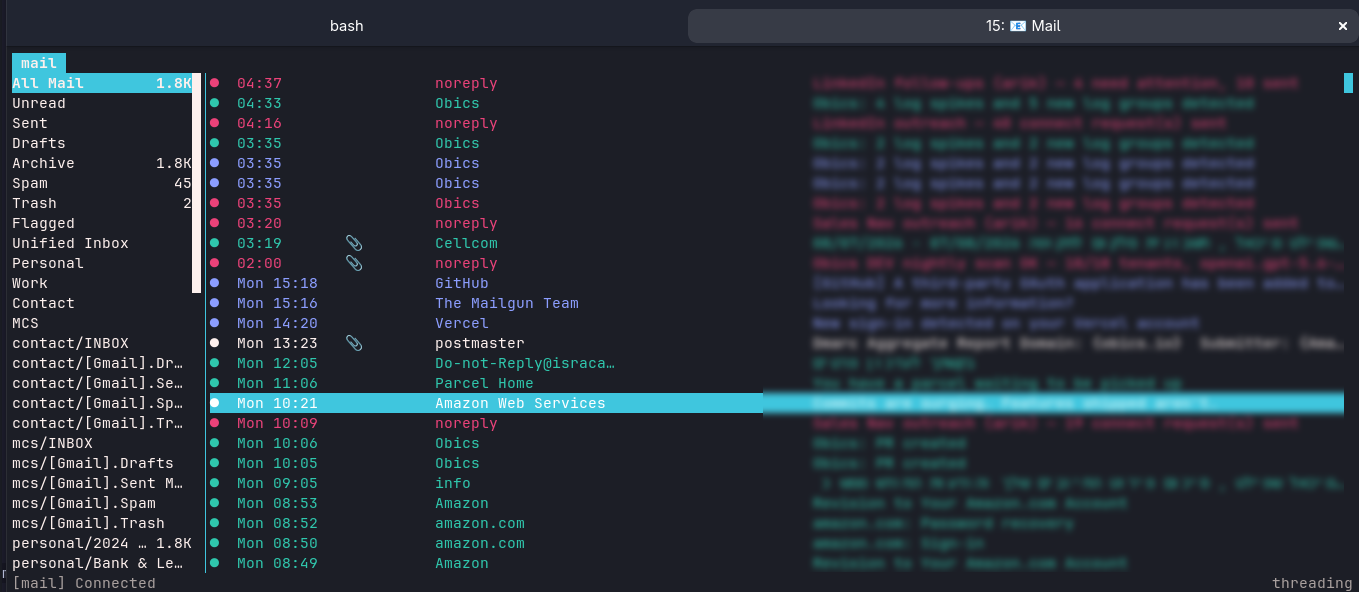
Features include:
- Vim keybindings - comes out of the box with aerc
- Keyboard for everything
- Different color per inbox
- Hotkeys to open an email in Gmail.com (ctrl + o) or open just the HTML in a browser (ctrl + w) without the Gmail overhead.
The killer feature is my draft with AI flow. Pressing Ctrl + X + C (Claude) or Ctrl + X + O (OpenAI) or Ctrl + X + G (Gemini) starts the flow. I enter an instructions text like:

Since my local AI agents have the skills to connect to my calendars, it just works. A few seconds later, the reply is saved as a draft.
Unlike in Gmail or Outlook, this feature:
- Doesn’t cost an extra $10-20/mo
- Works with my existing skills and memory
- Allows LLM model choice
- A single key binding away
- Actually works well
Recap
The first wow factor in this experience for me is that a terminal-first tool doesn’t try to guess what I want. It is configurable and extensible by its form factor. This is amplified by Linux culture, which embraces terminal-first, customization, key bindings, and scripting.
The second cool thing is how it shows the age of personalized software. We spent decades accepting whatever common-denominator apps existed, because building software for a niche audience was too expensive. It isn’t anymore. Now it is changed; you don’t wait for the feature anymore. You wire it up yourself in an afternoon.



Comments
Loading comments…